


Re-download all Shopify product data to Mixtable
Re-download all Shopify product data to Mixtable
Mixtable keeps your Shopify data syncing automatically in the background, so your worksheets usually stay up to date. But sometimes you need a fresh pull of everything, especially if you’ve just added new Shopify metafields or started syncing new fields that aren’t showing up yet.
When that happens, you can trigger a full re-download of all product data from Shopify into Mixtable.
Tip: If the Shopify sync card shows updates from Shopify, you don’t need a full re-download to get them. Just click Apply now.
When to re-download your product data
Common reasons to re-download Shopify product data:
- You added new Shopify metafields and want them to appear in Mixtable
- You started syncing a new product field and want to refresh what Mixtable has
- A product worksheet looks out of date and you want to pull everything fresh
- A Media Images worksheet shows blank product or variant columns
Re-download all product data from Shopify
- Open any Mixtable spreadsheet connected to your Shopify store
- In the top toolbar, click Shopify Sync
- In the Shopify Sync dialog, find the Shopify store you want to refresh
- Click Download all product data
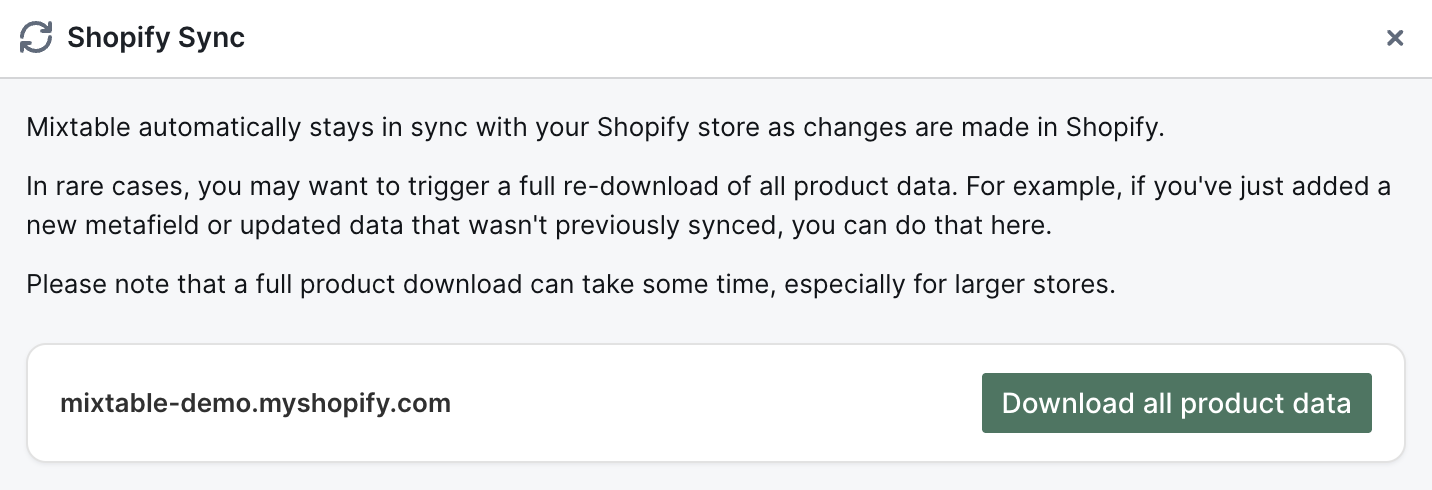
Mixtable will queue the re-download and start pulling product information from Shopify in the background.
What to expect
- Nothing in your Shopify store changes, because a re-download only reads data
- Mixtable replaces its own copy of your Shopify data, rebuilding your products, variants, images, and the links between them
- A full download can take a while on larger stores
- You can keep working in Mixtable while it runs
- Worksheets using that data update on their own as the fresh data arrives
Troubleshooting
I don’t see my Shopify store in the list
Make sure your Shopify store is connected to the workspace you’re currently in, then open Shopify Sync again.
The data still looks the same
The download takes time to complete. Wait a few minutes, then refresh your browser tab and check again.
You're ready!
Mixtable is an online spreadsheet designed to sync data with Shopify. It looks, feels, and behaves like Excel (including formulas), but runs in your browser. With Mixtable you can:
- Bulk add products to collections, edit metafields, add or remove tags;
- Change product prices, including international prices, and review price history;
- Manage customers with a spreadsheet CRM for Shopify;
- Use Excel features like sort ascending or descending, find-replace, filter, and more.
Best of all, you can sync changes back to Shopify with a single click. Find out more about the Mixtable suite of products here.
Manage Shopify data in a spreadsheet.
Use Mixtable to edit, sync, analyze, import, and export your Shopify store data without CSV juggling.