Shopify Translations, Performance Improvements, and More
On this page
Bulk edit Shopify translations in a spreadsheet
You can now map translated content directly into your Mixtable worksheets and sync changes to Shopify in one click. This works for products, collections, pages, blogs, articles, and media image alt tags, across any language your store has configured in Shopify.
Add a translation column to any Shopify-linked worksheet by clicking the lightning bolt button and choosing Translations. Select the field you want to translate (for example, Product Title), choose the language, and optionally scope it to a specific Shopify Market. Mixtable loads any existing translations from Shopify and lets you read, fill, or correct them in bulk. When you’re ready, click Send to Shopify to push all changes at once.
A Load Latest button in the column settings lets you refresh the column with the current translations from Shopify at any time.
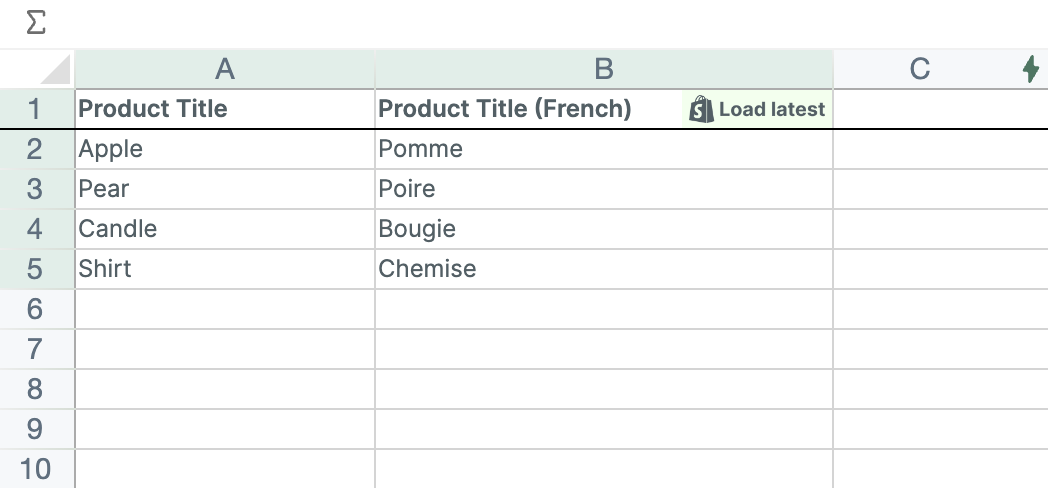
One capability the Shopify admin currently does not support is translating image alt tags. With Mixtable you can translate alt tags in bulk and sync them to Shopify directly.
Read more: Bulk edit Shopify translations
Significantly faster spreadsheet load times
Spreadsheet load performance has been substantially improved. Your Shopify data now appears much faster when opening a spreadsheet or adding a new worksheet, with noticeably less time between opening and seeing your data ready to work with. Row additions, row deletions, and worksheet sorts are also faster.
Customer language field
You can now map the Language field to a column on any customers worksheet. This shows each customer’s preferred language as a locale code (for example en, fr, or pt-BR) and lets you update it in bulk directly from the spreadsheet.
Read more: Bulk edit customer language
Product action columns now available on the Products (with variants) worksheet
Action columns for products (Add Tags, Remove Tags, Add to Collections, Remove from Collections, Add Images) are now available on Products (with variants) worksheets, in addition to the Products (no variants) worksheet where they were previously supported.
Read more: Action columns
Fill Missing Worksheet Data dialog
A new Fill Missing Worksheet Data option in the Worksheet menu lets you restore rows that were accidentally deleted from a Shopify-linked worksheet. Mixtable compares your worksheet against your Shopify store and adds back any missing rows in the background, without touching the rows already present.
Read more: Fill Missing Worksheet Data