
Setary vs Mixtable: Shopify Spreadsheet Editors Compared
 Spreadsheet EditorAnalytics Spreadsheet Updated October 27, 2026
 On this page
Setary and Mixtable both put your Shopify catalog in a live spreadsheet, so you can bulk edit without exporting a CSV file and importing it back. From a distance they look alike. Up close they make different bets.
Setary is a focused product editor at one flat price. You filter products and variants, apply a bulk action such as set, append, or replace, preview, and save. Mixtable is a full spreadsheet for your whole store: formulas, many worksheets, and data well beyond products, at a price that follows your Shopify plan. This comparison covers where each one fits, including where Setary is the better and cheaper choice.
Which one to choose: Setary vs. Mixtable?
| Setary Bulk Spreadsheet Editor | Mixtable Spreadsheet Editor | |
|---|---|---|
| What’s similar |
|
|
| Approach | Filter rows, apply a bulk action (set, clear, append, replace, change prices by percent or amount), preview, save | Edit cells directly, with formulas, bulk tools, or pasting from Excel, then review the sync preview and sync now or at a set time |
| Differences |
|
|
| Used by |
|
|
| Popular for |
|
|
| Price |
|
|
| App store links | Setary | Mixtable |
What both apps are good at
- Editing a large catalog without files. Both load your products and variants into a grid you edit in the browser. Nothing changes in Shopify until you review the changes and save or sync them
- The fields that matter for products. Both reach variants, metafields, tags, images, and stock levels at each of your locations, which the Shopify admin makes slow to edit across many products
- No caps on catalog size. Neither app meters products per edit, so a 50,000-variant store pays the same as a 500-variant store on the same plan
Where Setary is better
1. A lower, flat price. Setary costs $9.99/month (or $99/year) on every Shopify plan. Mixtable’s editing plans follow your Shopify plan, so on Grow and Advanced Setary costs less than a third of Mixtable’s $35/month, and on Shopify Plus about a fifth of $49/month. If product and variant editing is all you need, that difference is real.
2. AI-written descriptions. Setary can write product descriptions in bulk with AI. Mixtable has no AI writing. It gives you a formatted text editor for descriptions and formulas to build titles, tags, and SEO text from your own data.
3. Several stores and platforms. Setary connects several Shopify stores to one login with a store switcher, and offers versions for WooCommerce and WordPress under the same account. Mixtable works with Shopify only.
4. Saved views. Setary saves combinations of filters and columns as views you can switch between. In Mixtable you get a similar result by keeping separate worksheets, or by making a conditional worksheet that only shows the rows that match your conditions.
5. No stored copy of your products. Setary reads and writes through Shopify each time and says it doesn’t store your product data. Mixtable keeps a copy of the Shopify data your spreadsheets use, which is what lets it open large worksheets quickly, run formulas and filters over every row, and show cell and row history. If keeping your product data out of any third-party database matters most to you, Setary’s approach fits better.
Where Mixtable is better
1. Formulas. Setary has no formulas: every change is a bulk action you pick from a list. Mixtable is a real spreadsheet, so you can price from cost and a margin column, build SEO titles from vendor and product type, look up supplier prices from a pasted sheet, or flag every variant whose compare-at price is below its price. See Excel formulas for Shopify for examples.
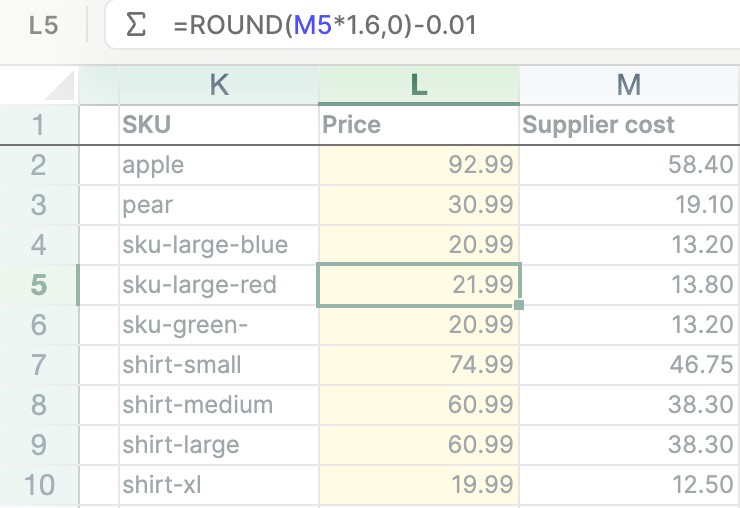
2. Your whole store, not just products. Setary edits products and variants. Mixtable also edits orders, customers, collections, blog posts, pages, metaobjects, SEO fields, market and B2B prices, and translations, so one spreadsheet can hold a product worksheet, an inventory worksheet, and a customer worksheet side by side.
3. Scheduled changes. Neither app runs repeating schedules, but Mixtable can send chosen edits to Shopify at a set time, and can schedule a return to the original values too. That is how you run a weekend sale that starts and ends on its own. See scheduled changes.
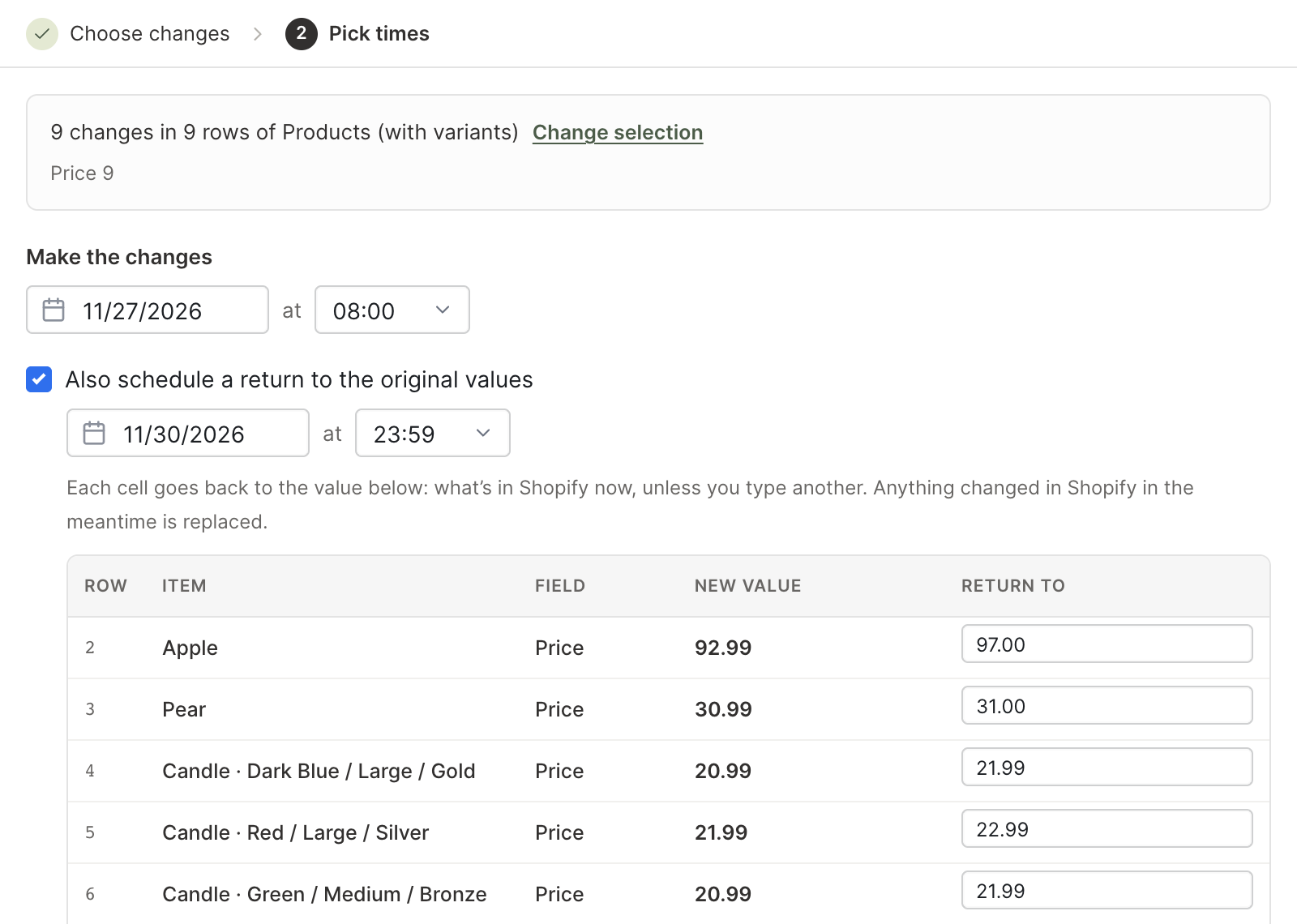
4. Inside the Shopify admin. Setary runs on its own website. Mixtable opens inside your Shopify admin as a Built for Shopify app, and also works on the web for teammates who don’t use the admin.
5. Stock changes that respect new sales. Besides setting stock levels, Mixtable has an inventory adjustment column that adds or removes units at a location. Because it sends a change rather than a new total, orders placed while you were editing aren’t overwritten.
6. Teamwork with review. Share a spreadsheet with teammates by email and choose who can view, who can edit, and who can sync. Edits from people who can’t sync wait as drafts until you review and sync them. Teammates don’t need their own Shopify account. See collaborate on Shopify data.
7. Editing and reporting in one spreadsheet. Mixtable Analytics Spreadsheet adds reporting worksheets and analytics columns such as net sales, sell-through rate, and days of stock left beside the products you edit. It is free for stores with fewer than 1,000 lifetime orders, and $15 to $49/month by Shopify plan for larger stores. Setary has no analytics.
Recently changed
If you are reading other comparisons, two Mixtable facts changed in October 2026: Mixtable now schedules changes to sync at a set time, and Mixtable Analytics Spreadsheet is priced from $15/month by Shopify plan (free below 1,000 lifetime orders) rather than from $29/month.
How do they compare on price?
Setary
- One plan: $9.99/month, or $99/year
- Each Shopify store is a separate installation with its own subscription
- 7-day free trial and a 48-hour demo with sample data. There is no free plan
Mixtable offers three apps, so you pick what you need
-
Only need to export? The Mixtable Export: Excel & CSV app is free. Load the Shopify data you want and export it to Excel or CSV at no cost.
-
Need to bulk edit? Mixtable Spreadsheet Editor adds editing and syncing, priced by the Shopify plan your store is on:
- Free ($0), export to CSV and Excel
- Basic ($15/month)
- Grow & Advanced ($35/month)
- Shopify Plus ($49/month)
-
Need reporting? Mixtable Analytics Spreadsheet is free for stores with fewer than 1,000 lifetime orders, and $15 to $49/month by Shopify plan for larger stores.
Every paid editing plan has the same features, with no caps on products, rows, or edits, and a store’s first plan starts with a free seven-day trial.
Conclusion
Choose Setary if you only edit products and variants, want the lowest flat price, want AI to write descriptions, or run several stores or WooCommerce sites from one place. On a Grow, Advanced, or Plus store, the price gap is hard to argue with when products are all you touch.
Choose Mixtable if your work goes beyond the catalog, or if you think in formulas. Pricing from a margin column, fixing orders and customers, editing market and B2B prices, scheduling a sale, sharing a worksheet with a supplier, and checking what sold, all happen in one spreadsheet that opens inside your Shopify admin.
Both offer a free trial, so try each one against a real task from your week.
Setary’s details come from its Shopify App Store listing, pricing page, and own comparison, checked October 27, 2026.