
Shopify + Airtable Sync Apps vs Mixtable: Costs and Limits
 Spreadsheet EditorAnalytics Spreadsheet Updated October 27, 2026
 On this page
Airtable is a popular home for product operations. Teams use it to track suppliers, photo shoots, launch dates, and approvals, so it is natural to want the Shopify catalog in the same base. Airtable has no built-in Shopify connection, though, so getting there takes two pieces: an Airtable plan and a Shopify app that syncs the two.
That setup is powerful when Airtable holds work that Shopify doesn’t. When the job is editing Shopify data itself, a spreadsheet made for Shopify is often simpler and cheaper. This comparison explains how the Airtable route works, what it costs, and where each approach fits.
How do you manage a Shopify store from Airtable?
There are three common ways, and they do different jobs:
- A two-way sync app. Apps such as SyncBase, AirPower, and TableLink copy products, variants, inventory, and more into Airtable tables and send your Airtable edits back to Shopify. This is the route for bulk editing
- An automation tool. Zapier or Make react to one event at a time, such as “new order in Shopify, create a record in Airtable” or “record updated in Airtable, update the product”. They are good for logging and small updates, not for editing thousands of products at once
- A read-only copy. Some tools, such as Whalesync, now keep a live, read-only copy of Shopify data in Airtable for reporting. Nothing you change in that copy reaches your store
Which one to choose: Airtable + a sync app vs. Mixtable?
| Airtable + SyncBase | Airtable + AirPower | Airtable + TableLink | Mixtable Spreadsheet Editor | |
|---|---|---|---|---|
| How edits reach Shopify | Real-time two-way sync | Shopify changes flow into Airtable; Airtable edits go to Shopify when you click run or on a schedule you set | Automatic or manual two-way sync | You review every change in a preview, then sync now or at a set time |
| Data covered | Products, variants, inventory, collections, metafields, metaobjects; orders, customers, and blog posts from Business up | Products, variants, collections, inventory, metafields, metaobjects, orders, customers, B2B companies, pages, blog posts, translations; market and B2B prices on Plus | Products, inventory, orders, draft orders, metafields, pages, blogs | Products, variants, inventory by location, metafields, collections, orders, customers, B2B companies, blog posts, pages, metaobjects, SEO, market and B2B prices, translations |
| What is metered | Products and variants: 1,500, 10,000, 30,000, then unlimited on Enterprise | No row caps | Products and variants: 600, 2,500, 5,500, then unlimited on Enterprise | Nothing on paid editing plans |
| Sync app price |
|
|
|
|
| Plus Airtable |
| Same | Same | No other subscription needed |
| App store links | SyncBase | AirPower | TableLink | Mixtable |
What the Airtable route and Mixtable have in common
- A grid instead of the Shopify admin. Both let you see thousands of products and variants as rows, sort and filter them, and change many at once
- Changes go back to your store. With a two-way sync app, edits made in Airtable reach Shopify, just as Mixtable syncs edits from its spreadsheet
- Room for your own columns. In Airtable you add any field you like. In Mixtable you can keep your own notes or helper columns beside the Shopify columns, or add a separate worksheet for supplier data
Where Airtable with a sync app is better
1. Your Airtable base holds more than Shopify. If the base already runs your supplier pipeline, sample tracking, photography schedule, or approval process, syncing Shopify into it keeps everything linked. A product record can point to its supplier, its shoot, and its launch checklist. Mixtable is a spreadsheet for Shopify data, not a database for the rest of your operations.
2. Airtable’s own tools. Interfaces, forms, linked records, and Airtable automations let you build small internal apps on top of your catalog, such as a form where suppliers submit new products or a dashboard for your launch team.
3. People who only look are free. Airtable doesn’t charge for read-only collaborators on Team and Business plans, so a large team can view the base while only a few people edit it.
4. More than one sales channel. If Shopify is one of several places you sell, Airtable can be the neutral home for product data that feeds them all. Mixtable works with Shopify only.
Where Mixtable is better
1. One app instead of two bills that grow. The Airtable route has two prices: Airtable charges each person who edits, and the sync app charges by plan, often with product caps. Three editors on Airtable Team plus SyncBase Business come to about $109/month (3 × $20 + $49), and a catalog above 10,000 products and variants moves SyncBase to $99/month. Mixtable is one app priced by your Shopify plan, $15 to $49/month, with no caps on products, rows, or edits, and teammates sign in with a free Mixtable login.
2. No record limits to plan around. Every row in Airtable is a record, and each base has a limit: 1,000 records on the free plan and 50,000 on Team. Variants, orders, and customers each take rows, so a large store can fill a Team base and need Business or a second base. Mixtable has no record limit on paid editing plans.
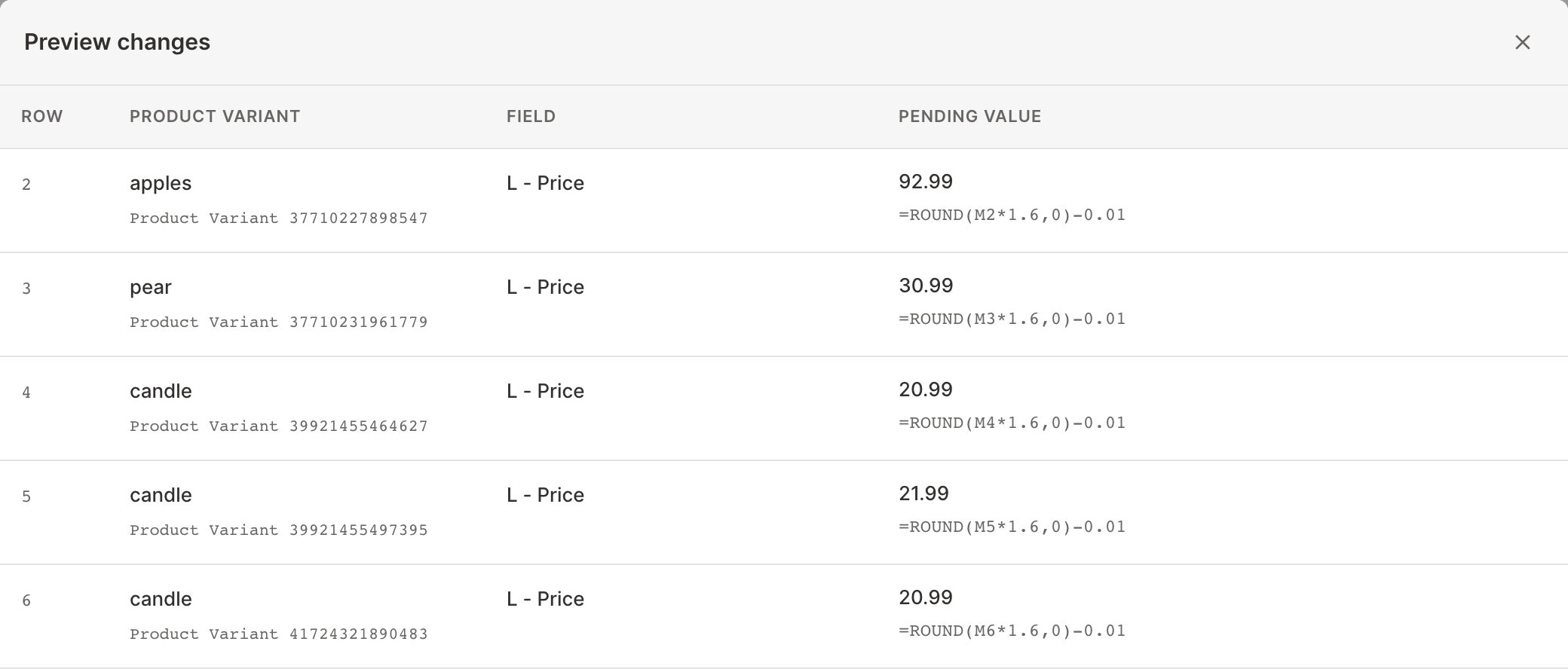
3. Nothing reaches your store until you have looked at it. With a real-time sync, an accidental paste or a formula filled down too far can reach your store before anyone notices. None of the sync app listings above describe a review step. In Mixtable, edited cells turn pale yellow and wait. When you click Sync now, the preview lists every row, field, and new value, and only then do you send them. Teammates who can edit but not sync leave their changes as drafts for you to review.
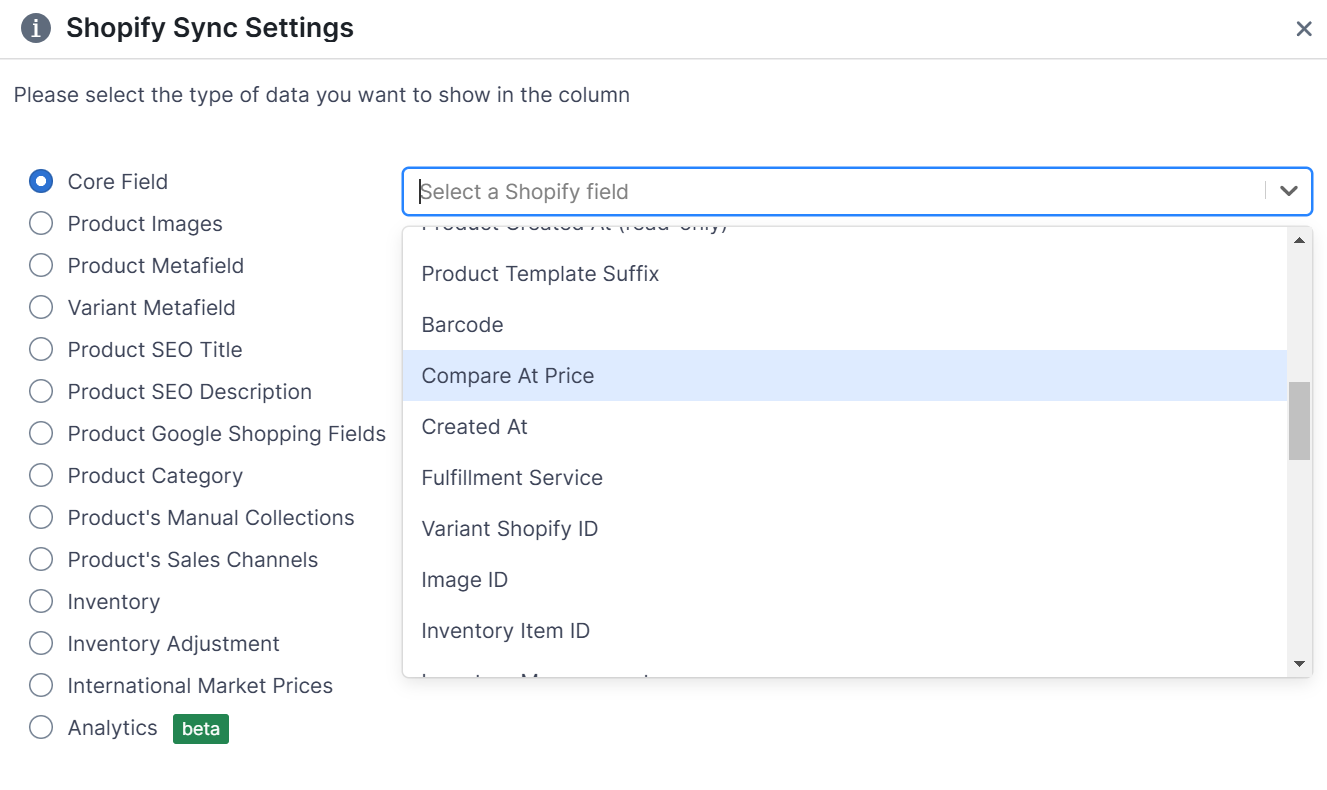
4. Shopify fields are built in, not mapped. In Airtable you design tables and fields, then map them to Shopify. In Mixtable you pick a template, and every other column comes from a searchable list of Shopify fields laid out like your Shopify admin, including metafields, inventory at each location, market and B2B prices, and translations.
5. Faster to start. Install the app inside your Shopify admin and your products load into a spreadsheet, with no base to design and no field mapping. Airtable’s API accepts five requests per second per base, and sync app reviewers mention first syncs of a large catalog taking hours.
6. Stock changes that respect new sales. Besides setting stock levels, Mixtable has an inventory adjustment column that adds or removes units at a location. Because it sends a change rather than a new total, orders placed while you were editing aren’t overwritten.
7. Scheduling and reporting built in. Scheduled changes let a sale start and end on its own. Mixtable Analytics Spreadsheet adds net sales, sell-through rate, and days of stock left beside the products you edit. It is free for stores with fewer than 1,000 lifetime orders, and $15 to $49/month by Shopify plan for larger stores.
How do they compare on price?
The Airtable route
You pay for both pieces:
- Airtable: Free (1,000 records per base, for trying it out), Team at $20 per editor/month billed yearly or $24 monthly (50,000 records per base), Business at $45 per editor/month billed yearly or $54 monthly
- SyncBase: Premium $24/month (1,500 products and variants), Business $49/month (10,000, plus orders and customers), Elite $99/month (30,000), Enterprise $200/month (unlimited)
- AirPower: Standard $35/month, Plus $40/month (adds market and B2B prices), with no row caps. Free for development stores
- TableLink: Basic $8/month (600 products and variants), Standard $19/month (2,500), Premium $39/month (5,500), Enterprise $99/month (unlimited)
Mixtable offers three apps, so you pick what you need
-
Only need to export? The Mixtable Export: Excel & CSV app is free, with no caps on exports.
-
Need to bulk edit? Mixtable Spreadsheet Editor adds editing and syncing, priced by the Shopify plan your store is on:
- Free ($0), export to CSV and Excel
- Basic ($15/month)
- Grow & Advanced ($35/month)
- Shopify Plus ($49/month)
-
Need reporting? Mixtable Analytics Spreadsheet is free for stores with fewer than 1,000 lifetime orders, and $15 to $49/month by Shopify plan for larger stores.
Every paid editing plan has the same features, with no caps on products, rows, or edits, and a store’s first plan starts with a free seven-day trial.
Conclusion
Choose Airtable with a sync app if Airtable already runs work beyond Shopify, such as suppliers, production, or approvals, and you want your catalog linked to it. Pick the sync app by how you want edits to travel: SyncBase for real-time two-way sync, AirPower to send Airtable edits when you run them or on a schedule, or TableLink for a low starting price on a small catalog.
Choose Mixtable if the work is editing Shopify itself. You get one app at one price, no record or product caps, Shopify fields ready to pick, a preview before anything changes in your store, and orders, customers, content, and market prices in the same spreadsheet.
Each option has a free trial, so try them on a real edit from your week.
Details of Airtable, SyncBase, AirPower, and TableLink come from their pricing pages, Shopify App Store listings, and documentation, checked October 27, 2026.