
Shopify Google Sheets Sync Apps vs Mixtable: Limits and Pricing
 Spreadsheet EditorExport: Excel & CSV Updated October 27, 2026
 On this page
Plenty of merchants already run their business in Google Sheets: a supplier price list, a launch plan, a stock count. So when the Shopify admin gets too slow for bulk edits, connecting Shopify to Google Sheets feels like the natural next step. A sync app copies your products into a sheet, you edit them there, and the app sends your changes back to the store.
That works, and for some stores it is the right setup. Mixtable takes a different route: instead of connecting your store to a general spreadsheet, it is a spreadsheet built around Shopify data. This comparison covers three popular two-way Google Sheets sync apps (FlexSync, BulkEdit, and eCommix), what they do well, and where a Shopify spreadsheet is the simpler choice.
Which one to choose: Google Sheets sync apps vs. Mixtable?
| FlexSync: Google Sheets Sync | BulkEdit: Google Sheets Sync | eCommix: Google Sheets Sync | Mixtable Spreadsheet Editor | |
|---|---|---|---|---|
| How edits reach Shopify | Automatic by default: supported edits update Shopify right away, and formula results sync every 5 minutes | You push the sheet’s changes back in one click | You validate, then import, or schedule automatic imports | You review every change in a preview, then sync now or at a set time |
| Preview before Shopify changes | Not described in its docs | A backup copy of the sheet is saved before each sync | Yes, a Validate step shows what will change | Yes, every sync goes through the preview |
| Formulas | Google Sheets formulas, with a cap on formula-driven cells by plan | Google Sheets formulas, filters, and fill down | Only in a helper column the app ignores | Excel-style formulas in any column, no cap |
| Data covered | Products, variants, prices, SKUs, barcodes, orders, draft orders, metafields, inventory by location | Products, variants, inventory, orders, metafields, translations, collections, images, tags, SEO | Products, variants, images, inventory by location, orders, customers, metafields, collections | Products, variants, inventory by location, metafields, collections, orders, customers, blog posts, pages, metaobjects, SEO, market and B2B prices, translations |
| What is metered | SKUs and formula-driven cells: 500 SKUs free, then 1,000, 5,000, and 25,000 | Products, variants, and other records: 1,000 free, 5,000 on Basic, unlimited on Pro | Rows imported per spreadsheet: 20 free, then 200, 1,000, and unlimited on Gold | Nothing on paid editing plans |
| Price |
|
|
|
|
| App store links | FlexSync | BulkEdit | eCommix | Mixtable |
What Google Sheets sync apps and Mixtable have in common
- A spreadsheet instead of the Shopify admin. Both give you rows and columns of products and variants you can sort, filter, and change many at a time, instead of opening products one by one
- Changes go back to your store. Unlike an export, both send edited values back to Shopify, so the sheet is where the work happens
- Formulas for repeatable edits. FlexSync and BulkEdit let you use Google Sheets formulas, and Mixtable has its own Excel-style formulas, so a price can come from a cost and a margin instead of being typed
Where a Google Sheets sync app is better
1. Your team already lives in Google Workspace. If your supplier lists, launch plans, and reports are all Google Sheets, a sync app keeps your products next to them. Comments, version history, sharing, and add-ons all come from Google, and everyone already knows how they work.
2. Low starting prices. Each of these apps has a free plan for small catalogs, and BulkEdit’s Pro plan removes its record caps for $14/month. A small store on a higher Shopify plan can pay less than Mixtable’s $35 or $49/month.
3. Edits that go live on their own. FlexSync’s automatic sync is the point for some stores. When stock counts live in a sheet that another person or a formula keeps updating, FlexSync sends supported changes to Shopify without anyone clicking a button. Mixtable always waits for you to sync, or for a change you scheduled.
4. Connecting to the rest of Google. A Google Sheet can feed Looker Studio, run Apps Script, or pull in other sheets with formulas. Mixtable is its own spreadsheet. You can paste data in, import a CSV, or export to Excel or CSV, but it doesn’t connect to other Google tools.
Where Mixtable is better
1. Nothing reaches your store until you have looked at it. In a general spreadsheet it is easy to drag a formula one row too far or paste into the wrong column. With automatic sync, that mistake goes straight to your store. In Mixtable, edited cells turn pale yellow and wait. When you click Sync now, the preview lists every row, field, and new value, including values calculated by formulas, and only then do you send them. Teammates who can edit but not sync leave their changes as drafts for you to review.
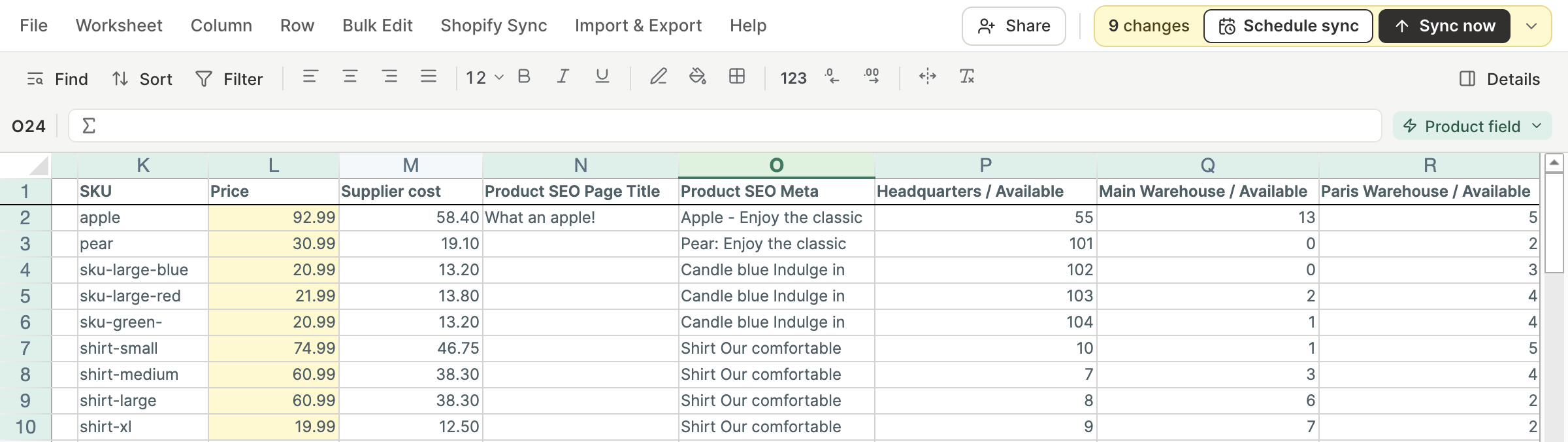
2. No caps to outgrow. Most sync app plans are drawn around how many SKUs, records, rows, or formula cells you sync: FlexSync tops out at 25,000 SKUs and 10,000 formula-driven cells before a custom plan, and eCommix’s Bronze and Silver plans import 200 and 1,000 rows per spreadsheet. Mixtable’s paid editing plans follow your Shopify plan and have no caps on products, rows, formulas, or edits, so a big catalog or a big sale doesn’t change the price.
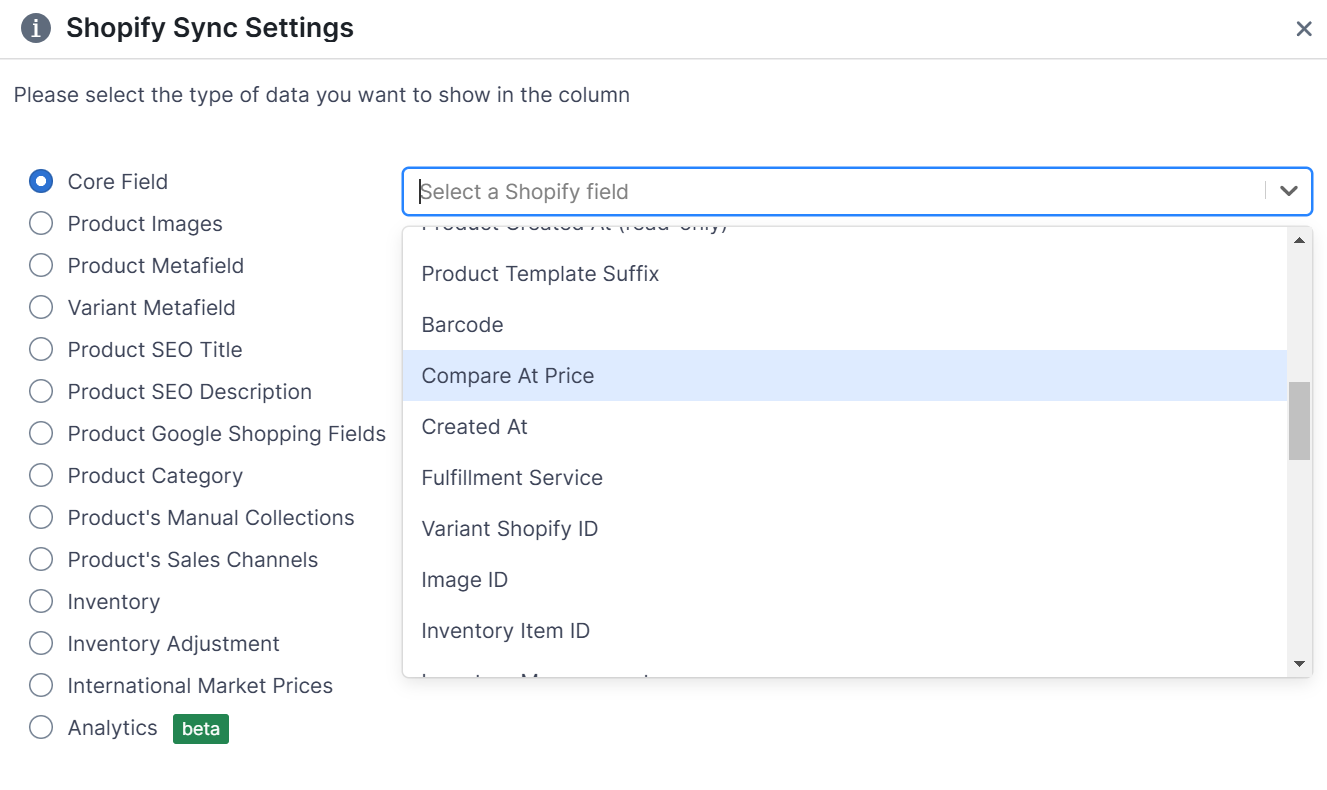
3. Shopify fields are built in. In a sync app, which columns sync back depends on the app, and the rest are read only. In Mixtable you add a column from a searchable list of Shopify fields, laid out like the product page in your Shopify admin, including metafields, market and B2B prices, inventory at each location, Google Shopping fields, and translations.
4. Your data stays up to date while you work, without overwriting you. Changes made in Shopify flow into Mixtable automatically. While you have the spreadsheet open, they wait until you apply them, so nothing shifts around while you are editing. eCommix’s own guide asks you to turn off its automatic refresh before editing, so a refresh doesn’t overwrite your work.
5. Stock changes that respect new sales. Besides setting stock levels, Mixtable has an inventory adjustment column that adds or removes units at a location. Because it sends a change rather than a new total, orders placed while you were editing aren’t overwritten.
6. More of the store in one place. Orders, customers, collections, blog posts, pages, metaobjects, and SEO fields each get their own worksheet in the same spreadsheet, and scheduled changes let a sale start and end on its own.
7. Nothing to set up in Google. There is no Google account to connect, no script to add to your sheet, and no columns to keep in the app’s expected order. Install the app, pick a template, and your products load into a spreadsheet inside your Shopify admin.
Just want your Shopify data in Google Sheets?
If you only need to read or share the data, not edit the store from it, you don’t need a two-way sync app. The free Mixtable Export: Excel & CSV app exports products, orders, customers, and more to Excel or CSV, with the columns you choose. Open the file in Google Sheets with File > Import. Mixtable doesn’t refresh a Google Sheet automatically, so if you need a sheet that stays current on its own, a sync or export app that writes to Google Sheets is the better fit.
How do they compare on price?
Google Sheets sync apps
- FlexSync: Free (500 SKUs, 20 formula-driven cells), Starter $9/month (1,000 SKUs), Growth $29/month (5,000 SKUs), Ultimate $49/month (25,000 SKUs), custom above that
- BulkEdit: Free (1,000 products and variants), Basic $8/month (5,000), Pro $14/month (unlimited)
- eCommix: Free (20 rows), Bronze $9.99/month (200 import rows), Silver $29.99/month (1,000 import rows), Gold $49.99/month (unlimited)
Mixtable offers three apps, so you pick what you need
-
Only need to export? The Mixtable Export: Excel & CSV app is free, with no caps on exports.
-
Need to bulk edit? Mixtable Spreadsheet Editor adds editing and syncing, priced by the Shopify plan your store is on:
- Free ($0), export to CSV and Excel
- Basic ($15/month)
- Grow & Advanced ($35/month)
- Shopify Plus ($49/month)
-
Need reporting? Mixtable Analytics Spreadsheet adds reporting worksheets to the same spreadsheet. It is free for stores with fewer than 1,000 lifetime orders, and $15 to $49/month by Shopify plan for larger stores.
Every paid editing plan has the same features, with no caps on products, rows, or edits, and a store’s first plan starts with a free seven-day trial.
Conclusion
Choose a Google Sheets sync app if your team already works in Google Sheets, your catalog fits under the plan caps, or you want a sheet that other people or formulas keep updating and that pushes to Shopify on its own.
Choose Mixtable if you want a spreadsheet made for Shopify data: every change previewed before it reaches your store, no caps as your catalog grows, Shopify fields picked from a list instead of mapped by hand, and orders, customers, content, and market prices in the same place.
All of these apps have a free plan or a free trial, so try them on a real edit from your week.
Details of FlexSync, BulkEdit, and eCommix come from their Shopify App Store listings and documentation, checked October 27, 2026.